Kanban and automation
The launch page
When “▶ Test” is ready, the page of the app the agent has just built opens by itself inside Escouade, in the agent’s “Page” view, with its developer tools. You test without switching windows, and each page stays tied to its worktree.
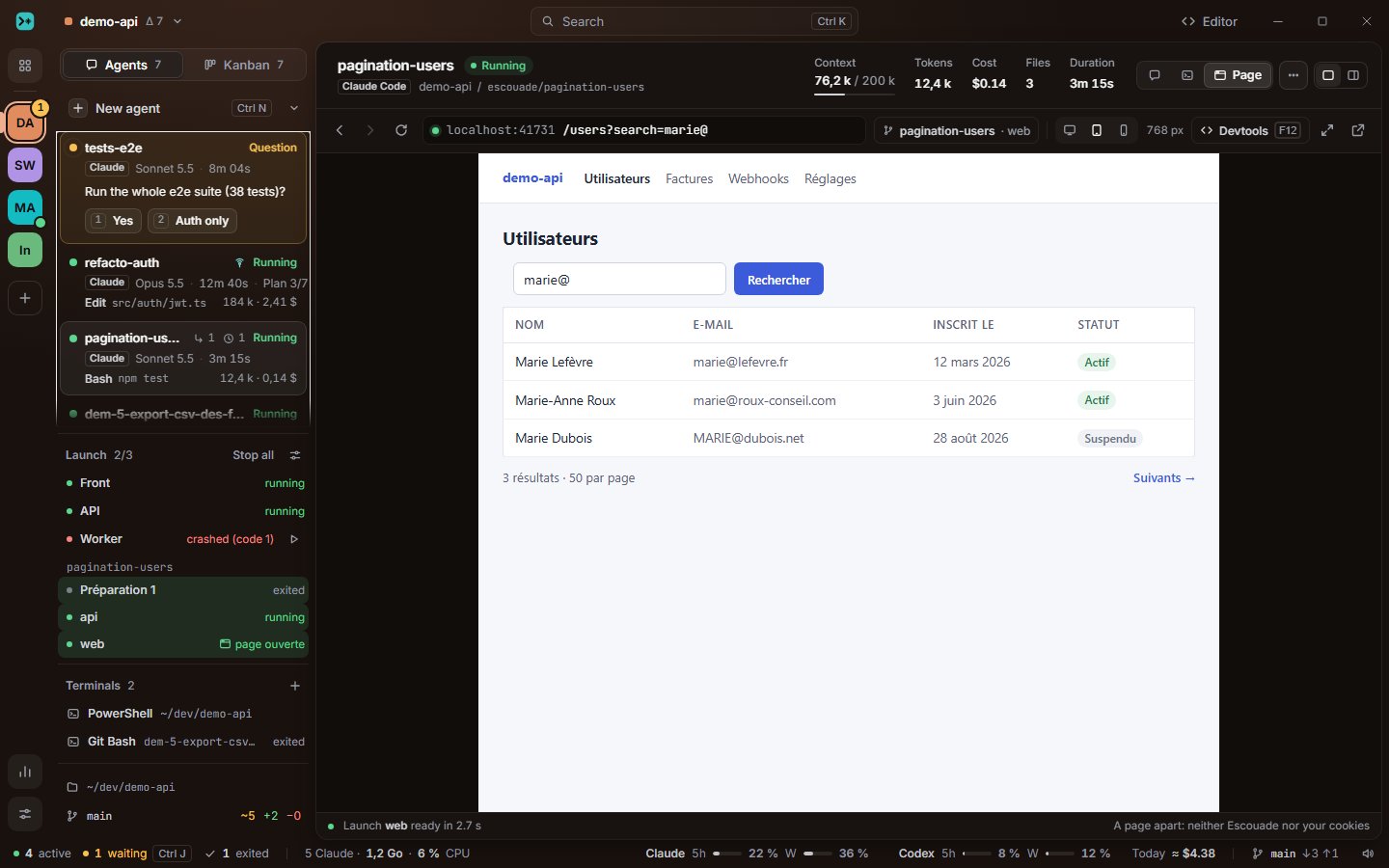
Where the page opens
As soon as the test’s processes answer (see Review and approve), the address that shows the feature opens where the project says, in Settings › Projects › Launch, “Open the launches’ pages”:
- In the agent (default): the page opens in the agent’s “Page” view, next to “Escouade” and the terminal view in its conversation header. If you were looking at this agent or at its “Test” window, Escouade shows you the page; otherwise it waits for you, and the process’s line under “Launch” says so.
- In a separate window: the page opens in the project’s “demo-api · Pages” window, one tab per worktree, which you can put on a second screen.
- In the system browser: as before, your browser opens on the address.
There is one page per worktree: running the test again reloads the same page, two worktrees have two pages. The setting stays on your machine; it is never written to the project’s .escouade.yml.
The page bar
| Button | What it does |
|---|---|
| Back, Forward, Reload | As in a browser. |
| The address | Editable: type a path or an address and Enter. Without http://, the address keeps the page’s. |
pagination-users · web |
Whose page it is: the worktree and the process that serves it. |
| Full width, Tablet, Mobile | The page’s width (see below). |
| Devtools | The developer tools of this page: console, network, elements. |
| Open in a separate window | The page moves to the project’s “Pages” window, without reloading. The same button brings it back. |
| Open in the system browser | The same address, in your browser. |
When the view is narrow, Forward, the widths, the separate window and the system browser move into “…”.
The dot before the address tells the page’s state:
- amber: it is loading, or the launch is starting again (“The launch is starting… The page opens here as soon as its server answers.”);
- red: it is not answering (“localhost:4101 is not answering”, after 20 s of a load that does not finish), with “Reload” and “View logs”; or the launch stopped (“The launch stopped”), with “Launch again” and “View logs”;
- green: it is loaded.
When a menu, a list, the palette or an Escouade window passes over the page, the page hides while they are open, then comes back.
The developer tools
The “Devtools” button, F12 or Ctrl+Shift+I (⌥⌘I on macOS) open the page’s developer tools, whether the focus is in the page or in Escouade. They are the system webview’s: Edge’s (WebView2) on Windows and WebKit’s inspector on macOS, each in their own window; WebKit’s inspector on Linux, attached to the page. Escouade’s own developer tools stay closed.
Full width, tablet, mobile
Three buttons next to “Devtools” change the page’s width:
- Full width: the page takes its whole area.
- Tablet: 768 px, centered on a neutral background, the height of the area.
- Mobile: 390 px, likewise.
The width shows next to them (“768 px”). If the area is narrower, the page narrows to the area and says so (“Narrowed to 692 px”). Ctrl+Shift+M (⇧⌘M on macOS) moves to the next width, from the page or from Escouade. The choice is kept for the page (the worktree and its process): a new launch keeps its width, in the agent as in the separate window.
Only the width changes: that is what triggers the page’s media queries. What else the site sees does not move:
| Windows (WebView2) | macOS (WKWebView) | Linux (WebKitGTK) | |
|---|---|---|---|
| Mobile user agent | Possible | Possible | Possible |
devicePixelRatio |
Possible, through the devtools protocol | No | No |
| Touch screen | Possible, through the devtools protocol | No | No |
This is not done yet: to emulate a whole device, use the device mode of the developer tools where they have one (Edge’s, on Windows).
A page apart
The page is the app you are building: Escouade does not trust it, without exception.
- It runs in a separate webview with access to no Escouade command: a call to
__TAURI__orinvokefrom the page is refused. - Its cookies and storage (localStorage, IndexedDB…) are the project’s, never the Escouade window’s: a
pages/<project>folder in Escouade’s data on Windows and Linux, a separate store on macOS 14 and later (a private session before). - It stays on its launch’s origin: a link to another origin (another port,
127.0.0.1instead oflocalhost, another site) opens in your browser, and Escouade says so (“github.com opened in your browser: only localhost:4101 shows here.”); Escouade’s addresses, files and other schemes open nowhere.
The “Pages” window
A project’s “demo-api · Pages” window has one tab per detached page (“pagination-users · web”, “refacto-auth · Front”…), and under the tabs the same bar as in the agent. Closing the window closes its pages; “Put back in the agent” brings a page back to its agent’s view without reloading it.