Kanban and automation
Reviewing and approving a ticket
When an agent is done, its ticket waits in “To review”. “▶ Test” launches its feature on ports of its own, after showing you what is going to run. “Approve” delivers the work, “Send back” hands it back to the agent with your remarks.
When a ticket reaches “To review”
A ticket moves to “To review” when all its criteria are met, or when the agent has used up its loops (the card then carries “Partial goal”). You are notified (“ready to review”), and the badge on “Kanban” counts one more ticket.
The card shows “What was done”, the criteria with the agent’s note on hover, the ticket’s cost, and “3/3 criteria”. Below: “▶ Test” when the agent has what it takes to launch its work, the approve button, and “Send back”.
To look at the work before deciding, open the agent (one click on the card): its conversation, its modified files, and their diffs read like those of any agent (see Git and The editor).
“Approve” and “Send back” are refused while the agent is still working: wait for the end of its turn.
Testing with “▶ Test”
Where the button is
The “▶ Test” button is on the “To review” card, in the header of the agent’s conversation, and in the “Test launch” part of the criteria report. It shows up when the agent has given its launch recipe (see below), or when isola runs the worktree’s services. It is not there for an archived agent, an agent without a worktree, or while the ticket is being approved: the app then refuses any test launch (“Approval under way: the test launch will wait until it’s over.”).
The agent’s protocol asks it to give its recipe at the latest once every criterion is met. If it is missing, the header of its conversation offers “Prepare launch”: the agent is invited to say how to launch its worktree, on its own ports.
The recipe the agent wrote
A recipe says how to launch the agent’s work in its worktree:
- “Setup” steps: commands run one after the other, each in a folder of the worktree (
npm install); - processes: a name, a command, a folder, environment variables, and the address that answers once the process is ready (a development server);
- the address to open in the browser, the one that shows the feature directly (the page, the screen, the state to test).
The agent writes it, and it runs in your shell, outside Claude Code’s permission mode. So Escouade shows it to you before running it. The first time, and every time the recipe changes (a command, a variable, a folder, or the address), the “Test DEM-6” window shows:
- “These commands were written by dem-6-limiter-les-tentatives. They run in your shell, outside Claude Code’s permission mode.”;
- “Setup”: each command and its “Folder” (“the worktree root” when it is empty);
- “Launch”: each process, its command, its “Folder”, its “Variable” entries, and its “Address”;
- “Opens in the browser”: the address that will open in the browser.
Nothing runs until you click “Run”; “Cancel” closes the window. Characters that would hide part of a command (a carriage return, a zero-width space, a direction mark…) are spelled out (⟨U+200B⟩), and long runs of spaces or blank lines are counted (“⟨24 spaces⟩”).
If the agent sends another recipe while you read, the window says so (“The recipe just changed: read it again before running.”) and “Run” stays shut for a second, so that a click aimed at the old one does not approve the new one. Your approval is kept with the agent: a recipe you approved that has not changed launches straight away next time. And Escouade refuses to run a step of a recipe you have not approved.
The reserved ports
Every ticket agent gets a block of 10 ports of its own, starting at 4100: 4100 to 4109, then 4110 to 4119… The block is the first one that no agent holds and whose ports are all free on your machine. That way the servers of several tickets run side by side without getting in each other’s way, or in the way of your own development server.
The agent knows its block. It must use it without writing it in versioned files (as arguments or environment variables). The commands of a test, those of the approval tests, and those of the worktree setup receive ESCOUADE_PORT_BASE (the first port) and ESCOUADE_PORT_END (the last one).
During the test
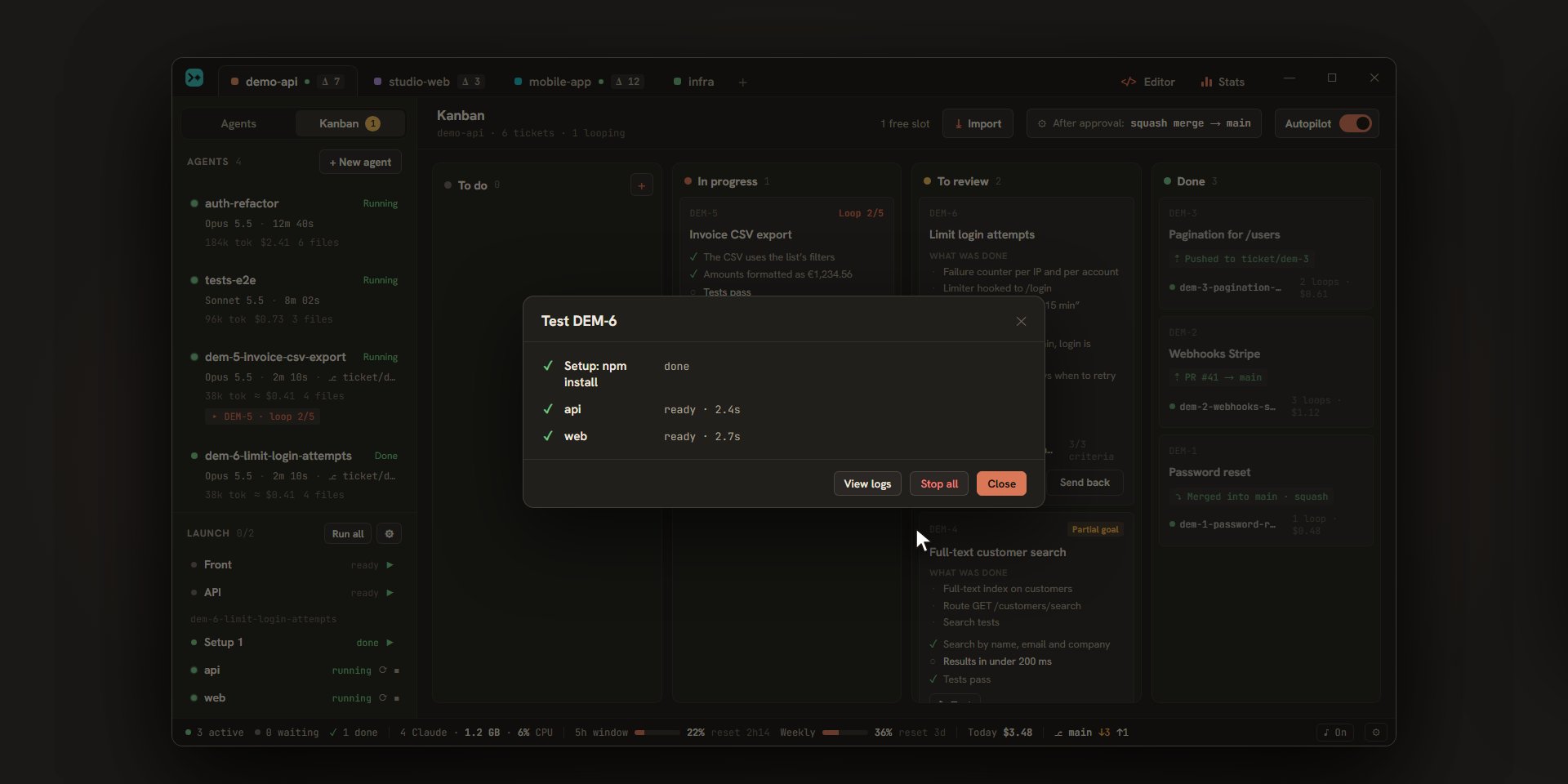
The window lists the steps, each with its state (✓ ready, … running, ✕ failed, ■ stopped, – skipped):
- The setup steps run one after the other. They only run once per recipe: as long as it does not change and Escouade stays open, a new test skips them. A failing step ends the test (“Setup failed (code 1)”).
- Each process starts in its own terminal, read-only. They show up in the “Launch” section of the sidebar, with their logs (see Launch commands).
- For each process that has an address, Escouade waits for it to answer (any HTTP answer counts, even a 404), for 3 minutes at most: “waiting for localhost:4101…”, then “ready · 2.4 s” or “No response from http://localhost:4101 after 3 min”.
- The browser opens on the address to open, or else on the first process’s address (“Opened in the browser: …”).
Once the test is ready, the window offers “Reopen” (the browser), “View logs”, “Stop all”, and “Close”. A failed line has its “View log”. A process that stops while the test is ready ends the test (“web stopped”).
While the servers run, the ticket’s card shows “■ Stop”, which stops them, and “Open”, which reopens the address. The servers also stop on their own when the ticket is approved, when its agent is archived or deleted, and when the project is closed.
With isola
When isola is installed and the worktree has a .isola.toml, isola runs the worktree’s services on its own ports and addresses. The agent then gets no block of ports, and it has no recipe to write: it only gives the address that shows the feature.
“▶ Test” then shows the .isola.toml under “isola configuration (.isola.toml)” (isola runs the commands in this file in your shell, outside Claude Code’s permission mode, and the agent may have written or edited it) and the address that will open. As with a recipe, nothing runs until “Run” and a modified file is shown again. The test runs isola up, waits for each service to answer, then opens the address. “Stop all” runs isola down.
Approving a ticket
The card’s button carries the name of what the approval does. It is set in the first group of Settings › Kanban, “When I approve a ticket in “To review””; the “After approval: …” button in the header leads there (see Kanban settings).
| Setting choice | Button | What happens | The “Done” card says |
|---|---|---|---|
| “Merge into a branch” | “Approve and merge” | What is left in the worktree is committed, then merged into the target branch with the chosen strategy: “Merge commit”, “Squash”, or “Rebase”. | “⤵ Merged into main · squash” |
| “Open a pull request” | “Approve + PR” | Commit, push of the ticket’s branch (ticket/<key>), then a pull request to the target branch, as a draft if “Draft PR” is on. |
“⇡ PR #41 → main” |
| “Push the ticket’s branch” | “Approve and push” | Commit and push of the ticket’s branch, with no merge or PR. | “⇡ Pushed to ticket/dem-3” |
| “Leave as is” | “Approve” | Nothing is committed: the changes stay in the worktree, and so does the agent. | “◇ Left in the worktree” |
A “To review” ticket can be approved even if it is in “Partial goal”.
Once the ticket is approved (except with “Leave as is”), its agent is archived. If “Delete the worktree once approved” is on (the default), the worktree is deleted after the project’s teardown commands. The ticket’s branch goes with it after a merge, or when the ticket brought no change; it stays when it was pushed or proposed as a PR. An existing branch that the ticket took up is never deleted. The ticket moves to “Done”, with its outcome, its cost, and its number of loops. An imported ticket updates its status and may leave a comment (see Jira, Trello, GitHub, and Linear).
If the ticket’s branch brings no change, the ticket is done all the same: “∅ No changes”.
The steps of an approval
The card shows the current step: “Approving…”, then, depending on the settings, “Tests…”, “Commit…”, and “Merge…” or “Push…”.
- Tests. With “Re-run the tests first” on and a “Test command” filled in, the command runs in the ticket’s worktree, with the port variables, for 20 minutes at most. The servers of any test are stopped first. If a test fails, the approval stops: the ticket goes back to “In progress” with its agent, which receives the end of the tests’ output (“The tests (
npm test) fail: …”) and starts again at loop 1. It comes back to “To review” when it is done. - Commit. Everything left in the worktree is committed, except the files copied from the project (
.env…), which never are: if the branch carries one, the approval stops and says so. The message is written by Haiku in the Conventional Commits format, with the key at the end of the line (feat: limit login attempts [DEM-6]), in the “Language of texts written by Claude”. If it gives nothing usable, the message isfeat: <title> [<key>]. With “Generated commit message” off, it isDEM-6 Limit login attempts. - Merge or push. The merge happens in the project’s folder when the target branch is checked out there (it is refused if tracked files have uncommitted changes there), in a temporary worktree otherwise, and it is refused when the target branch is checked out in an agent’s worktree. Two approvals in the same repository go one after the other. For a pull request, Escouade uses GitHub’s
ghCLI: the title is the commit message, and the description carries the ticket’s description, “What was done”, and the criteria as a checklist. Withoutgh, or if it fails, GitHub’s compare page opens in the browser, already filled in, and the card says “⇡ ticket/dem-6 pushed · PR to finish”. With a host other than GitHub, the branch is pushed and the card says “⇡ ticket/dem-6 pushed · PR to open on your host”.
When the merge deletes the worktree and files of the agent are open in the editor with unsaved changes, Escouade first asks “Approve DEM-6?”, saying what would be lost.
Conflicts
When the merge meets a conflict, it is undone: nothing is left half merged. The “On conflict” setting decides what follows.
| Setting | What happens |
|---|---|
| “Ask me” (the default) | The card gets blocked on “Conflict with main” and offers “Let the agent resolve” and “Cancel”. |
| “Let the agent resolve” | The agent takes the conflict on right away. |
| “Cancel” | The card gets blocked, naming the files (“Conflict with main on: a.ts, b.ts”), and offers “Retry”. |
“Let the agent resolve” merges the target branch into the ticket’s branch (or, with the “Rebase” strategy, asks the agent to rebase), leaves the conflicts in the worktree, and sends the ticket back to “In progress”, at loop 1, with the agent told. “Cancel” on the card removes the block: the ticket stays in “To review”.
When a step fails
A failed step (a target branch not found, an unresolved conflict in the worktree, a refused push…) leaves the ticket in “To review”, blocked with the first line of the error, and you are notified (“blocked”). The approve button becomes “Retry”: it restarts the approval.
Sending a ticket back to its agent
“Send back” opens a “What is wrong” field. Describe the problem (the “Send back” button stays disabled while the field is empty; Esc or “Cancel” drops it).
The ticket goes back to “In progress”, with the same agent and the same worktree, at loop 1. The agent receives “Test feedback on DEM-6: <your text>. Fix it, check every criterion again, then end with the report.” It loops again until it meets the criteria or uses up its loops, then the ticket comes back to “To review”. Every loop counts in the total shown on the “Done” card.
For how the agent loops on a ticket, see The autopilot.