Agents and chat
Agents
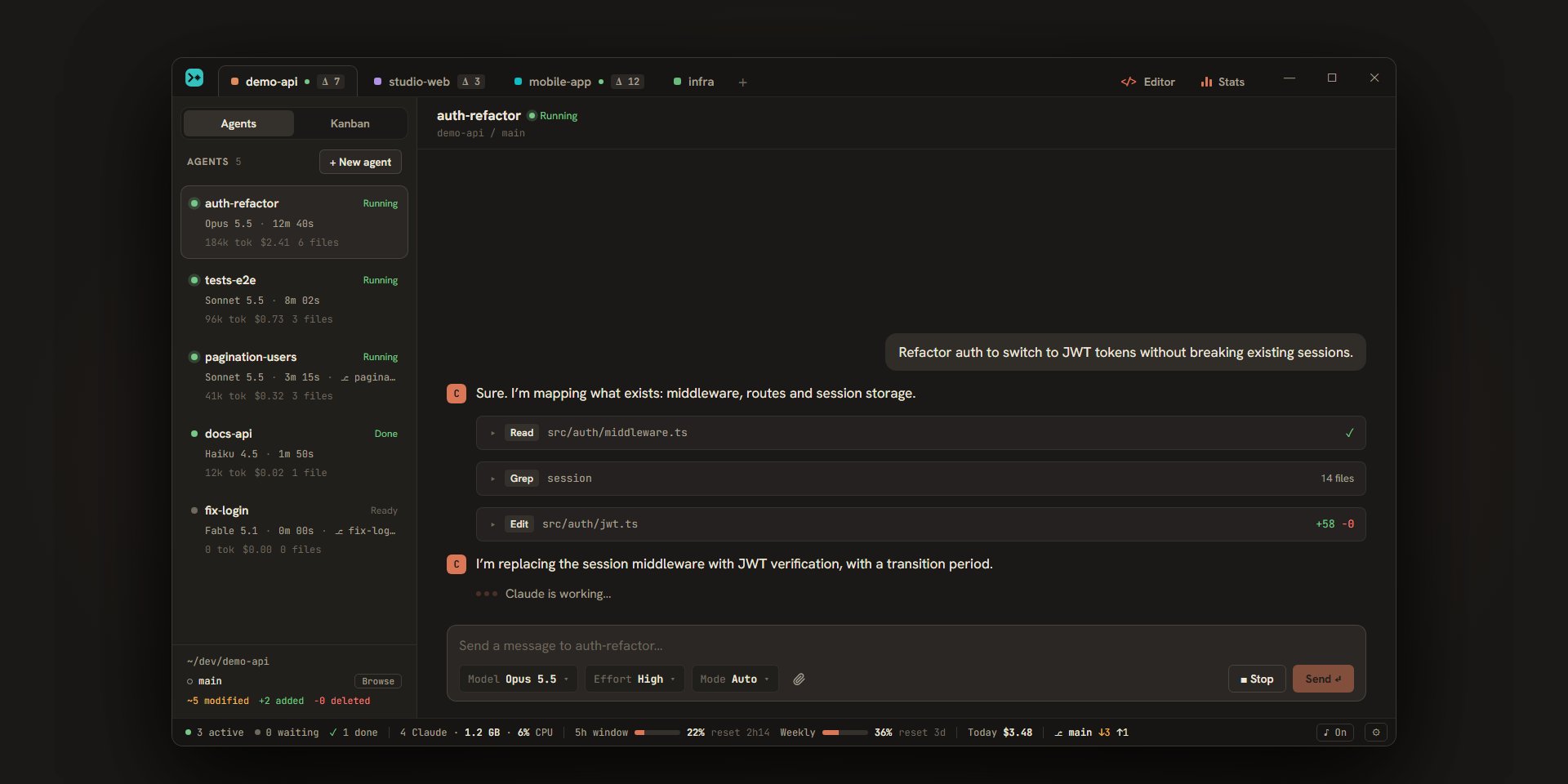
An agent is a Claude Code session that works in a project. This page explains how to create agents, choose their model, effort, and permission mode, follow them in the sidebar, then rename, duplicate, archive, or delete them.
What is an agent
Each agent is a Claude Code session: a conversation, a model, an effort, a permission mode, a Claude account, and, if you want, a git worktree of its own. A project can have several agents, each working on its own, and the sidebar on the left lists them. An agent’s conversation is described on the conversation page.
Create an agent
| To… | Do this |
|---|---|
| Create an agent in the project on screen | Ctrl+N, or the “+ New agent” button at the top of the list |
| Create the first agent of a project that has none | “Create an agent” in the empty list, or “New agent” in the middle of the window (“No agents in this project.”) |
| Work on a branch that already exists | The ▾ button to the right of “New agent” (“Other ways to create an agent”), then “New agent on a branch…”: pick the branch in the picker |
| Start from a branch in the branch picker | Right-click a branch, then “Start an agent on this branch” |
| Create an agent along with a project | In the “New project” window, the “Create a first agent” switch (on by default) also offers the model for that agent |
On macOS, Ctrl becomes ⌘ for shortcuts (except Ctrl+Tab).
The new agent is selected right away, and the cursor is in its message field: describe the task, that’s all. It takes the default model, effort, and permission mode from the settings, which you can then change for this agent alone (see below). While it has no message, the conversation shows “Agent ready” and the folder the agent works in.
Ticket agents are created by the Kanban (see the Kanban), and an agent can start others through the MCP server.
An agent’s name
A new agent is called agent-1, agent-2… As soon as you send it its first message, Escouade asks Haiku for a short name for the task, in lowercase and without accents, for example refacto-auth. That name replaces agent-N in the list after a few seconds; if it’s already taken in the project, Escouade adds -2, -3…
- A message that is a Claude Code command with nothing to draw a name from (
/clear,/model sonnet, a skill with no argument) doesn’t name the agent: the next message does. For a skill or custom command with arguments, the text of the command, without the slash, is the basis of the name. - If the agent works in a worktree that this same agent created, its branch takes the name that was found (
escouade/refacto-authwith the default prefix), as long as that branch name is free. A branch that existed before the agent keeps its name. - If Haiku’s answer isn’t a usable name, the agent keeps
agent-N. - An agent you renamed, or that is a copy of another, is never renamed automatically.
Model, effort, and permission mode
Under the message field, a bar of menus adjusts the agent: “Model”, “Effort”, and “Mode” (plus “Account” when you have several accounts). The values for new agents are in Settings › Claude Code, group “New agents”: “Default model” (Sonnet), “Default effort” (Medium), and “Default permission mode” (Auto). See the Claude Code settings.
Model
The menu offers four models: Fable, Opus, Sonnet, and Haiku. Each is shown with the version Claude Code runs for it, for example “Opus 5.5”; until Claude Code has announced its models (when an agent first starts), only the family name appears. The agent’s card and the conversation header show which model is in use.
Effort
Effort says how much Claude thinks before answering.
| Level | What it means |
|---|---|
| Low | Quick answers, little thinking |
| Medium | Balanced |
| High | Deep thinking |
| Very high | Very deep thinking |
| Max | Maximum thinking, uses more tokens |
Haiku doesn’t support effort: the menu is grayed out (“Haiku doesn’t support effort”).
Permission modes
The mode decides what Claude does without asking you.
| Mode | What it does |
|---|---|
| Auto | A classifier approves safe actions and asks about the rest. Unavailable with Haiku. |
| Ask | Claude asks for your approval before each sensitive action. |
| Plan | Claude analyzes and proposes a plan without changing anything. You approve it, or tell it to keep planning (see questions and permissions). |
| Accept edits | File edits are accepted without asking. |
| Bypass | No permission requests. Only for safe environments: when you pick it, a message reminds you that Claude will act without any permission request, and the menu turns red while it’s active. |
Changing them during a conversation
The model, effort, and mode menus stay usable for the agent’s whole life, even while it works. The choice applies to the agent right away, the conversation goes on, and it only holds for this agent. If the agent’s process is stopped (see below), the choice is picked up the next time it starts.
An agent’s account
When you’ve added several Claude accounts, an “Account” menu joins the others. Its first choice, “Automatic”, lets Escouade take the project’s account (its “Preferred account”), otherwise the first active account under the pause threshold; the name of the chosen account is written in parentheses. An agent’s account can no longer change after its first message, since its conversation is filed in that account: the menu is then read-only.
The page on accounts explains how to add them and what “Resume on…” does when an agent reaches the usage limit. The options are in the accounts settings.
Working in a worktree or on an existing branch
By default, an agent works in the project’s folder, like you. With the “One worktree per agent” option, each new agent gets its own worktree: a folder of its own, on a new branch escouade/<name> created from the project’s branch. Its changes stay separate, and you merge them whenever you want. You choose the option when you create the project, in the project settings, or by right-clicking the project’s tab and then “Turn on a worktree per agent”; it only applies to agents created afterwards.
- The agent’s card shows its branch after a
⎇. - If the project has setup commands (dependencies, generated code…), they run in the new worktree before the agent’s first message: the card says “Setting up…”, and your first message goes out once the setup is done.
- If the worktree can’t be created (a repository with no commit, for example), the agent works in the project’s folder and the conversation tells you so.
- With “New agent on a branch…”, the agent works in a worktree on a branch that already exists. It can’t be the branch of the project’s folder, nor the Kanban’s target branch, nor a branch another worktree holds. Deleting this agent never deletes that branch.
The full details are in worktrees and branches.
Following an agent in the sidebar
Each agent has a card in the list:
- its name, a colored dot, and its status;
- the model, how long it has worked, and, if it has a worktree, its branch;
- its tokens, its cost (preceded by “≈” while a turn runs: it’s then an estimate), and the number of files changed in its folder;
- the “Plan 2/7” line when it follows a task list (see plan progress);
- the
▸ KEYlabel of its ticket, when it has one; - a wave icon when remote control is on (see remote control);
- the line the agent publishes itself when it uses Escouade’s MCP server.
A click on the card shows it; Ctrl+Tab and Ctrl+Shift+Tab move to the project’s next or previous agent, skipping archived ones (see keeping track of your agents). When an agent asks a question, finishes, or fails while you weren’t looking at it, its card blinks until you show it (see notifications).
Statuses
| Status | Dot | What it means |
|---|---|---|
| Running | green | Claude is working. |
| Question | amber | Claude is waiting for an answer to a question or a permission. |
| Ready | gray | The agent was just created and hasn’t done anything yet. |
| Done | green | Its last turn is over, or you interrupted it. |
| Error | red | Its last turn ended with an error, or its process stopped. Send a message to restart Claude on the same session. |
In place of the status, the card can show “Setting up…” (the worktree is being set up) or “Resumes at 3:00 PM” (the agent reached the usage limit and restarts by itself when the quota resets).
Rename, duplicate, archive, delete
A right-click on an agent’s card opens its menu.
| Entry | What it does |
|---|---|
| Rename | The name becomes a field: Enter confirms, Esc cancels. A double-click on the card’s name does the same; a double-click on the name in the conversation header opens a “Rename the agent” window. Renaming doesn’t change the worktree’s branch. |
| Duplicate the conversation | Creates a copy: “name (copy)”, then “(copy 2)”… See below. Grayed out during a turn (“Wait for its turn to end.”). Absent for an archived agent. |
| Archive | Puts the agent away (“keeps the conversation”). See below. |
| Restore | Puts an archived agent back in the list. |
| Prepare launch | Asks the agent how to launch its worktree on its own ports (see testing). Only for an agent that has a worktree, with no ticket under way, and whose worktree isola doesn’t manage. |
| Integrate main | Brings the agent’s base branch into its own (the base’s name is written in the entry, main here). Only for an agent that has a worktree. See branches. |
| Open in editor | Opens the editor on the agent’s worktree, or on the project. |
| Open a terminal | Opens a terminal in the agent’s worktree, or in the project’s folder. |
| Turn on remote control | Makes the agent reachable from claude.ai and the Claude app (see remote control). Absent for an agent in the Claude Code view, where Claude Code’s own /remote-control command does it. |
| Delete… | Removes the agent after confirmation. See below. |
An archived agent only has “Rename”, “Restore”, and “Delete…”.
Duplicate the conversation
“Duplicate the conversation” creates a new agent that picks up the original’s conversation: same model, same effort, same mode, same account, and the Claude Code session is duplicated where the original stands, which stays as it is. The copy is called “name (copy)”.
- If the original works in a worktree, the copy gets a worktree of its own, created from the commit the original is on. Its uncommitted changes aren’t there, and a notice at the end of the copied conversation says so. Without a worktree, the copy works in the same folder.
- A ticket agent is copied like an ordinary agent: with no ticket.
- The entry is grayed out while the original works or waits for an answer.
Archive and restore
Archiving keeps the conversation but stops the agent: its Claude process stops, a turn in progress is interrupted, its remote control is turned off, and its test launches stop. The agent leaves the list and joins the “Archived (N)” section at the bottom; a click on it opens it read-only, with an “Agent archived.” banner and a “Restore” button.
If the agent works on an “In progress” or “To review” ticket, a confirmation warns you that the ticket goes back to “To do”. Restoring an agent whose worktree was deleted in the meantime recreates it from its branch, if that still exists.
Delete
“Delete…” asks for confirmation. The Claude process is stopped and the conversation is removed from Escouade; the Claude Code session itself stays on disk. A checkbox, checked by default, also deletes the agent’s worktree and its branch (“Also delete the worktree and the branch escouade/refacto-auth”); for an agent on a branch that existed before it, the checkbox only deletes the worktree (“Also delete the worktree (the branch … is kept)”). If files of that worktree are open and unsaved in the editor, the window tells you they will be lost. If cleaning up the worktree runs into a problem, it’s reported afterwards, and the agent is deleted anyway.
Closing the window, quitting, and restarting
Closing the window (the ✕ button in the title bar) doesn’t stop the agents: the window hides and Escouade stays in the notification area (the menu bar on macOS). The agents keep working, and their notifications arrive as usual. A click on the icon brings the window back; the icon’s menu offers “Show” and “Quit”. “Quit” stops every Claude process; if unsaved files remain in the editor, Escouade asks you first.
On restart, each agent gets its conversation back, and no Claude process is started ahead of time (except for the remote control agents). A turn that was running when the app stopped shows as “Done”; ticket agents pick their work up again by themselves (see the Kanban), the others wait for your next message. When you show an agent whose process is stopped, Escouade restarts it in the background so the first answer is quick (unless it’s archived, in error, or in the Claude Code view); otherwise, your next message, your next answer, or the next action on the agent restarts it. Either way, Claude Code picks up the same session (--resume): the agent hasn’t forgotten anything.
Idle processes
A Claude process takes up memory. When an agent hasn’t done anything for a while, Escouade therefore stops its process, conversation and session intact. The delay, 30 minutes by default, is set in Settings › Claude Code: “Stop idle Claude processes after (minutes)”; 0 turns the stopping off. It doesn’t apply to an agent that is working or waiting for an answer, nor to an agent whose remote control is on. The next action on the agent restarts its process on its session.
If an agent stops
If the process of an agent that was working ends without you asking, its card goes to “Error”, a red line in the conversation gives the exit code, and a banner says: “The agent stopped. Send a message to restart Claude on the same session.” If Claude Code can no longer find the session, a notice tells you (“Claude session not found: a new session will start with your next message.”) and the agent starts over on a new session, without the history Claude had in memory.