Tickets that agents pick up on their own
Each project’s Kanban: write a ticket and its acceptance criteria. Autopilot on, agents pick them up, each in its own worktree, and loop until every criterion is met.
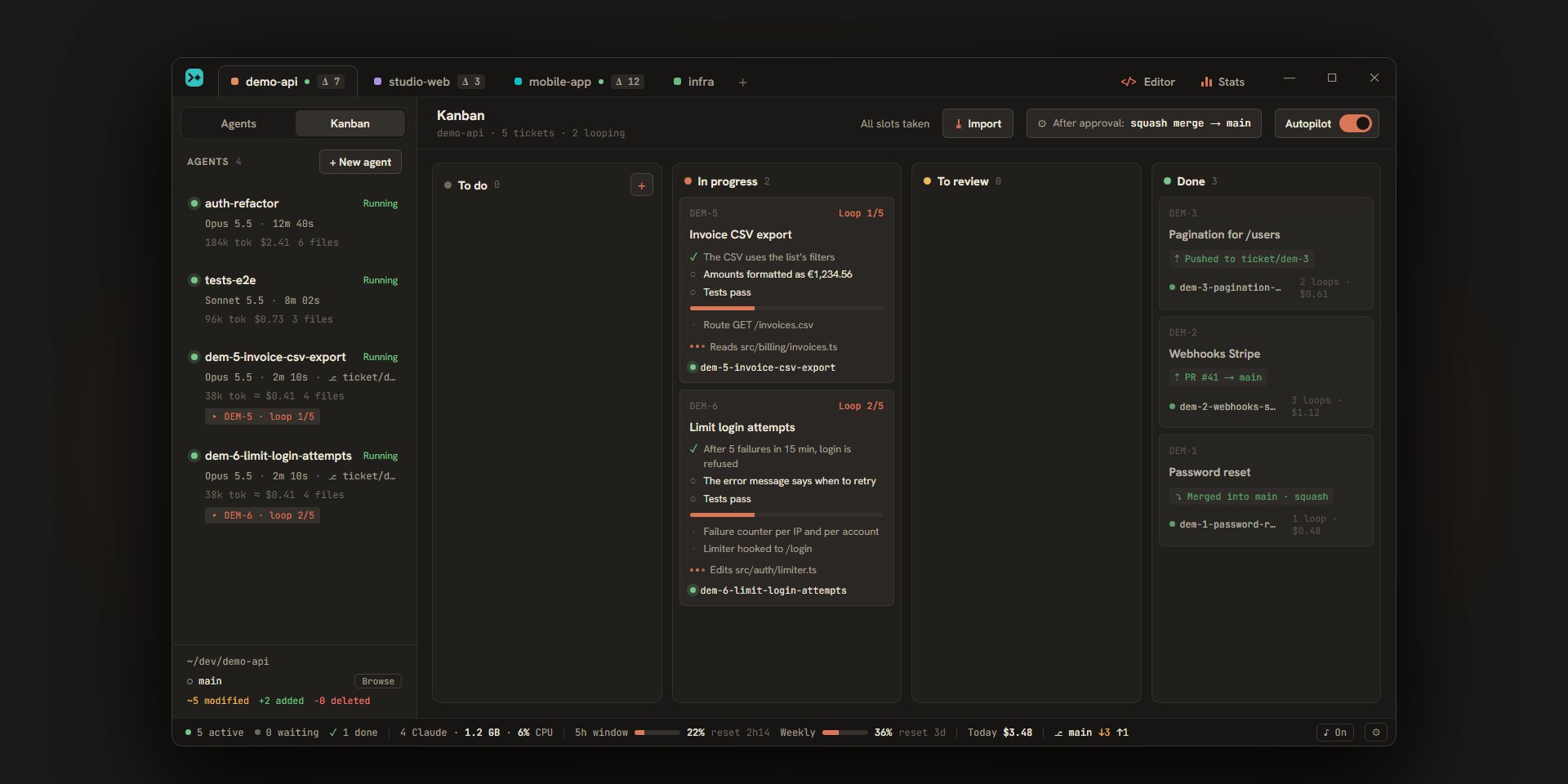
Plan, code, review, test, ship: the whole cycle runs with agents working in parallel, in a free, open source ADE that runs on your machine.
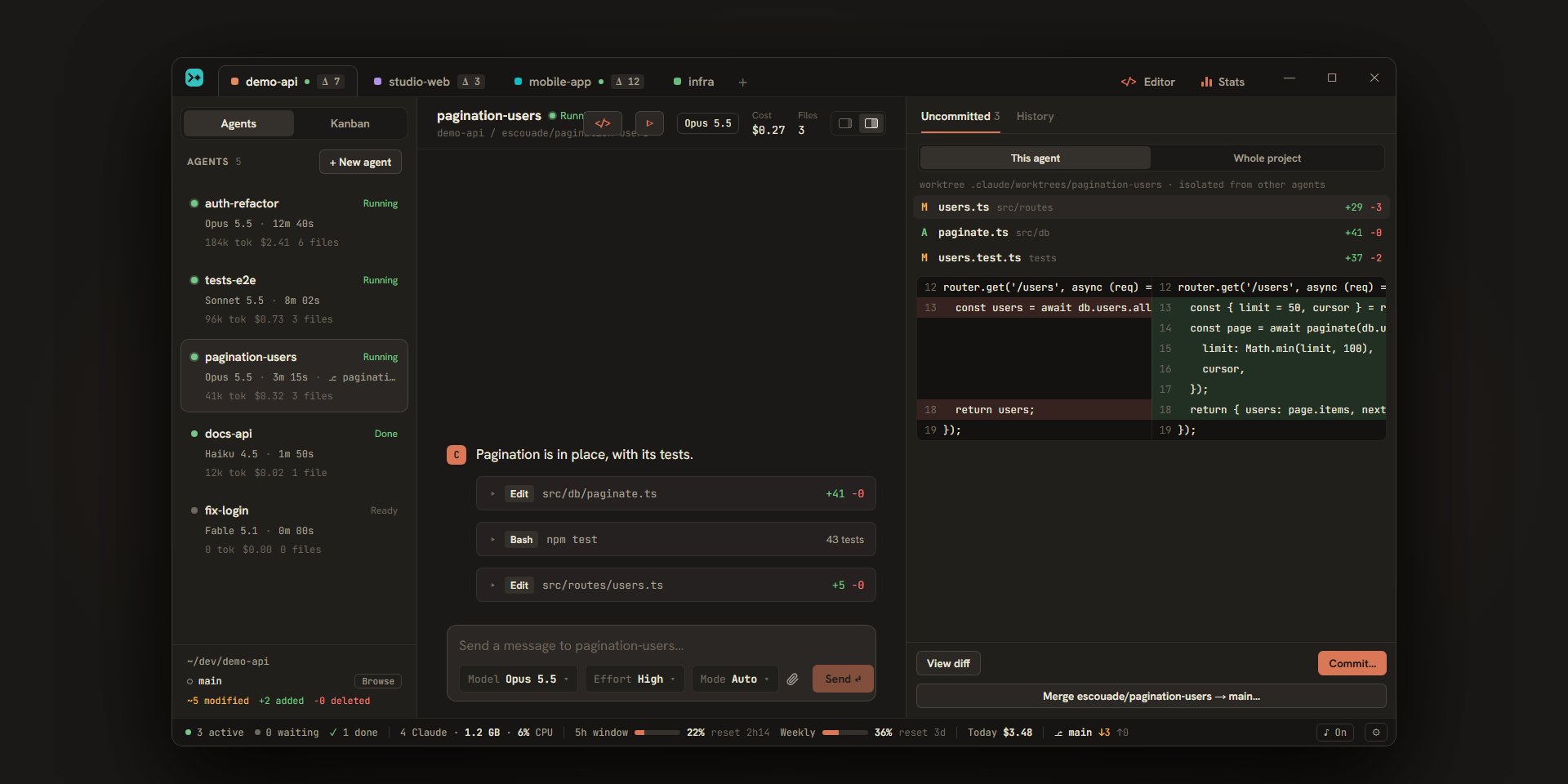
Write down what needs doing, or import it: each ticket carries its acceptance criteria, and autopilot hands it to an agent.
Each project’s Kanban: write a ticket and its acceptance criteria. Autopilot on, agents pick them up, each in its own worktree, and loop until every criterion is met.
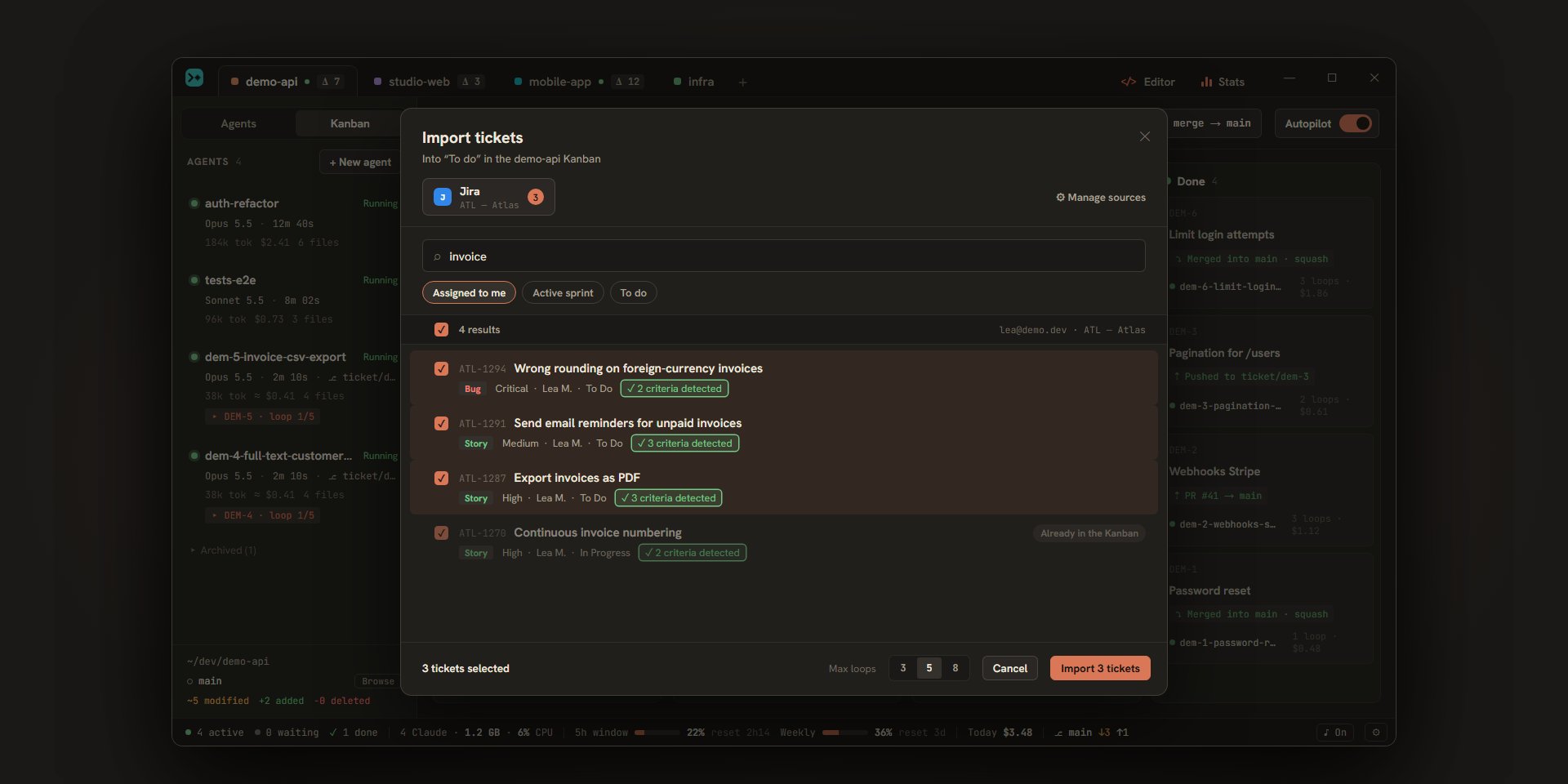
Link a source to your project, “Import”, tick: the tickets arrive with their acceptance criteria. Escouade keeps their status up to date and comments on the original ticket when it is ready for review, then done.
Paste a screenshot or a mockup, attach a log or a spreadsheet: the ticket’s agent gets them with its instructions.
A ticket can wait for others before it starts, or pick up a branch that already exists.
From 1 to 6 agents in parallel, a number of loops per ticket, and a pause near the limit of your quotas.
Agents in parallel, each in its own worktree: you follow their work live, and take over in the editor or a terminal.
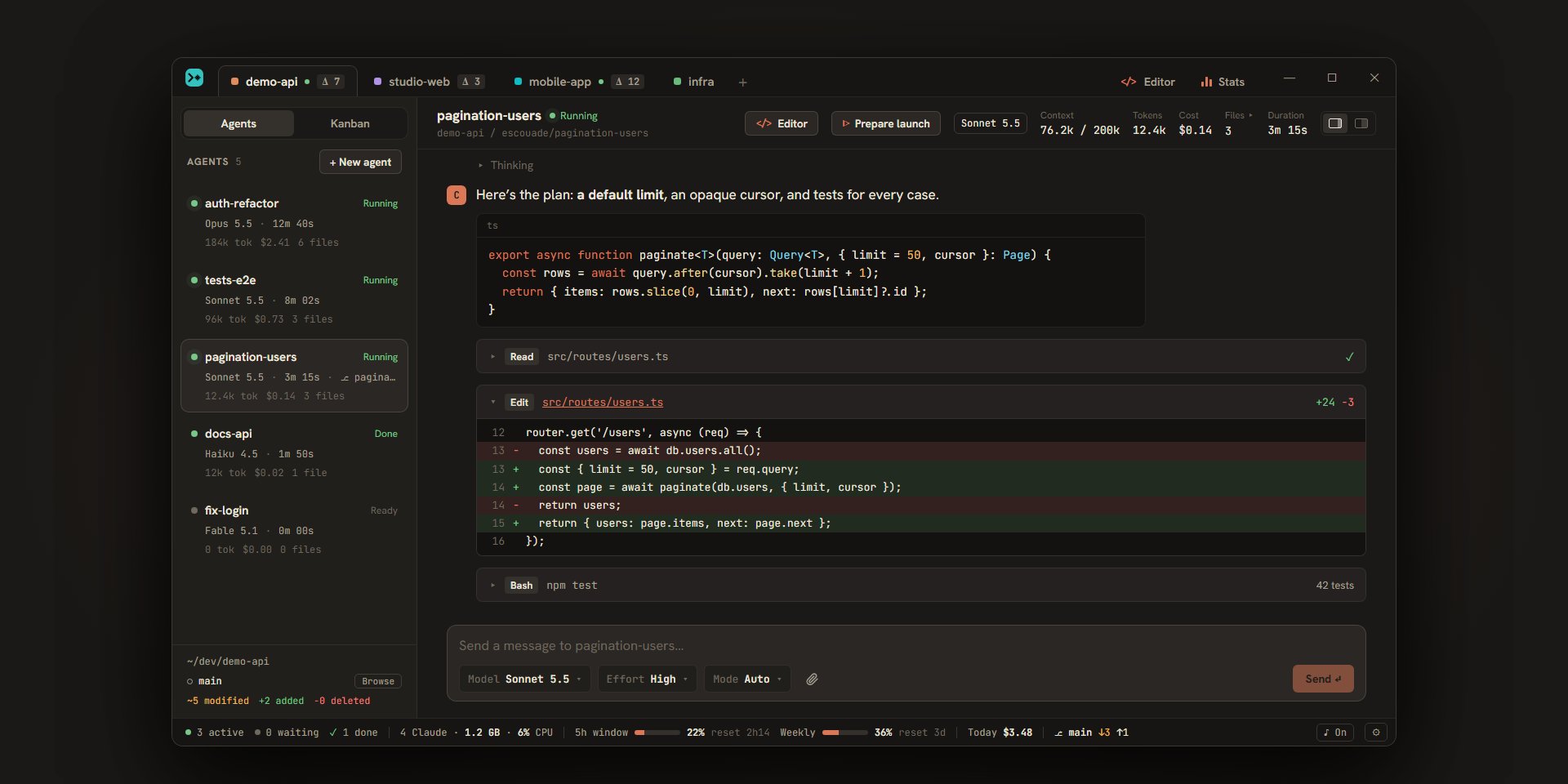
One tab per project, and in each as many agents as you like: each with its own conversation, model, effort and, if you want, its own git worktree. Status, tokens, cost and files touched, live.
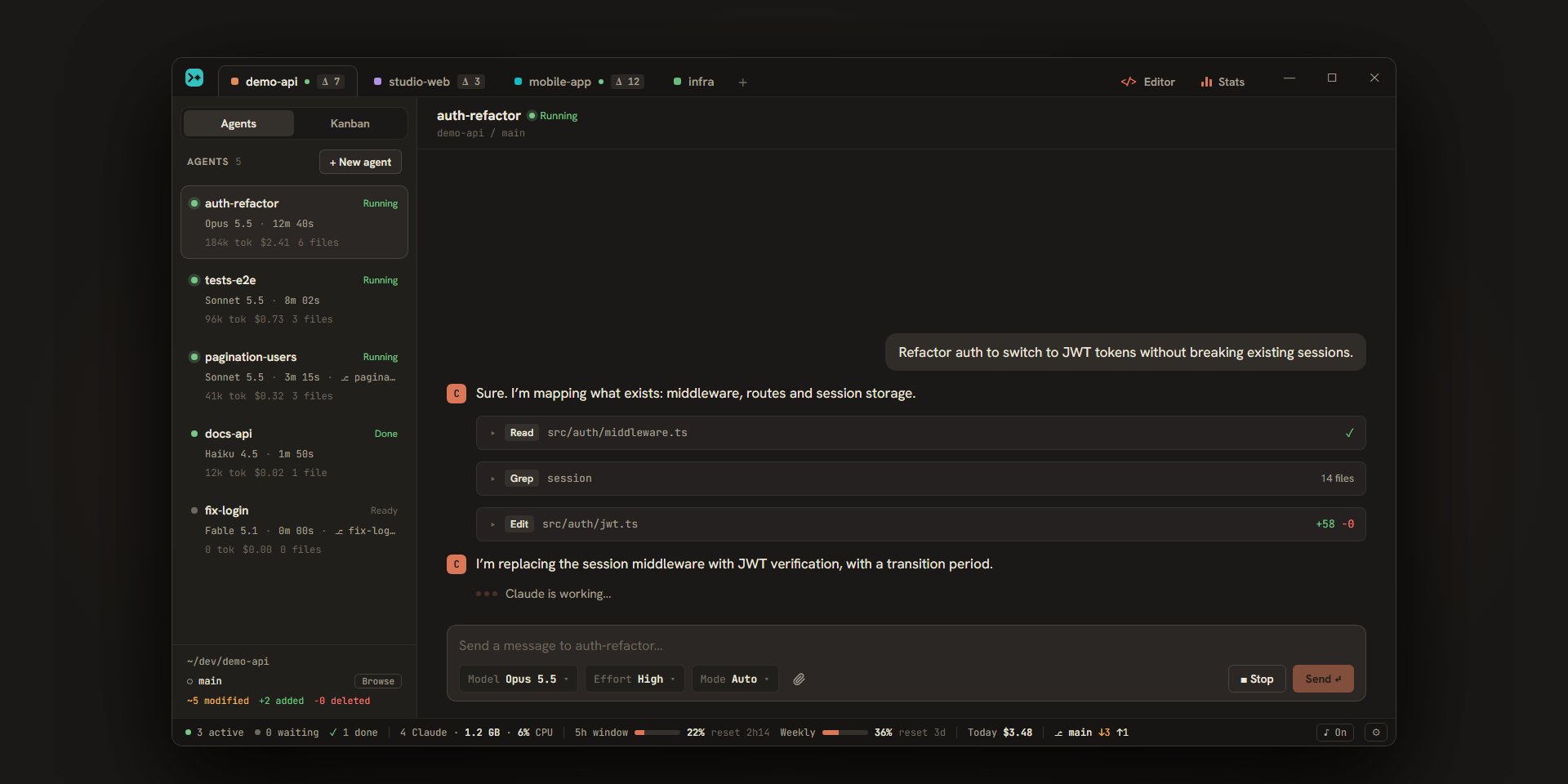
Markdown, highlighted code, tool calls that unfold into a diff, questions and permission requests as cards you answer with a click. Prefer Claude Code’s interface? One button moves the agent there, in a terminal, without losing its session, and Escouade still follows it: notifications, cost, plan.
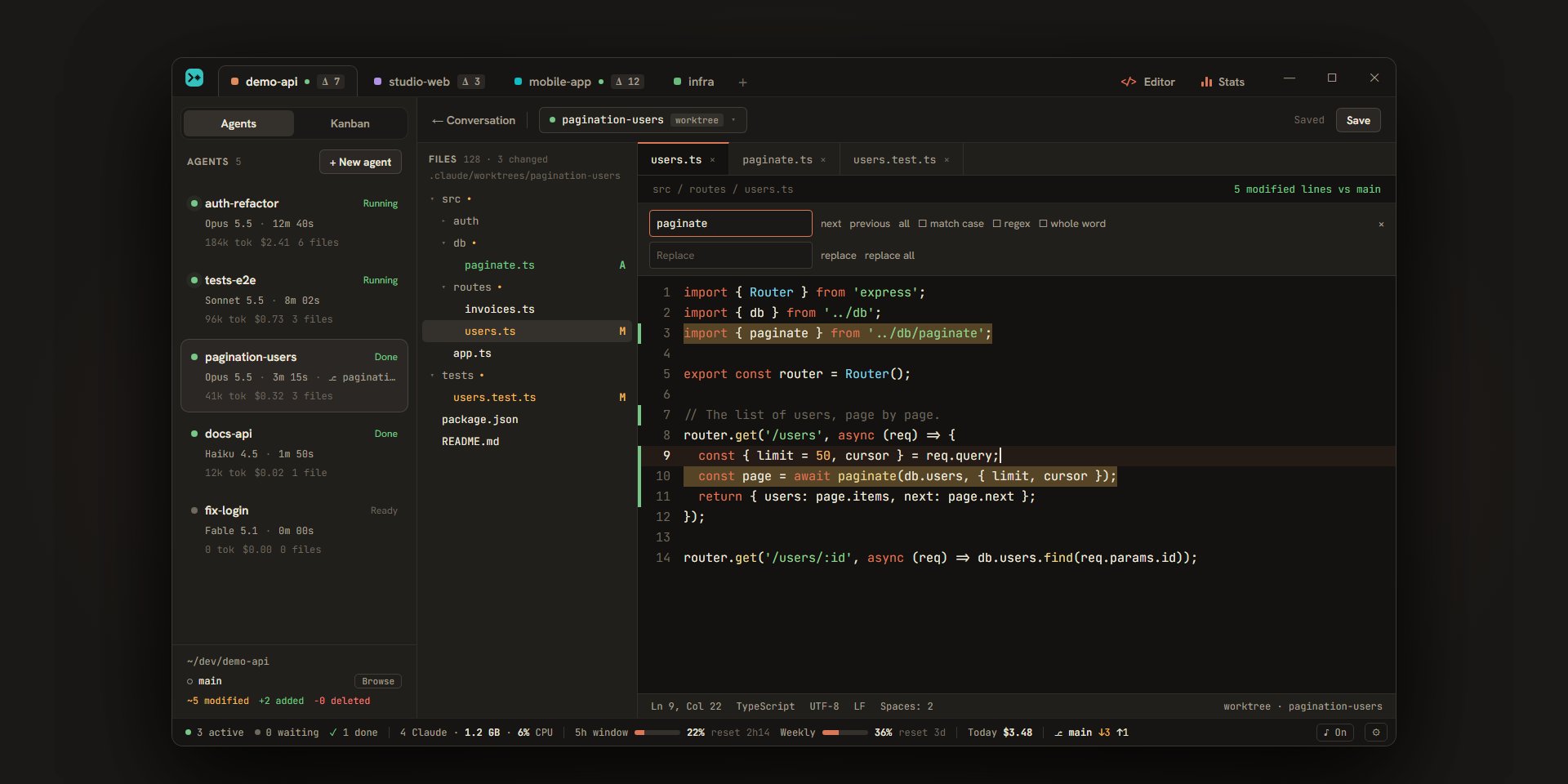
File tree, tabs, syntax highlighting and changed lines in the gutter. Ctrl+click goes to a definition without a language server, Ctrl+P opens a file by name, Ctrl+Shift+F searches every file.
What an agent starts shows in the sidebar: each subagent with its conversation, each background command with its live output.
A banner says where an agent following a plan stands: the tasks done, the subagents at work, the task that is blocked.
A screenshot of the bug, a PDF, an archive, a 150 MB log: drop them into the message, the agent reads them.
Every change gets reviewed before it goes in: diffs, history and branches, then the app started on the ticket’s feature.
Uncommitted files per agent, side-by-side diffs, the repository’s git graph. A commit written by the agent or a proposed message you review, then a merge or squash of a worktree into its branch.
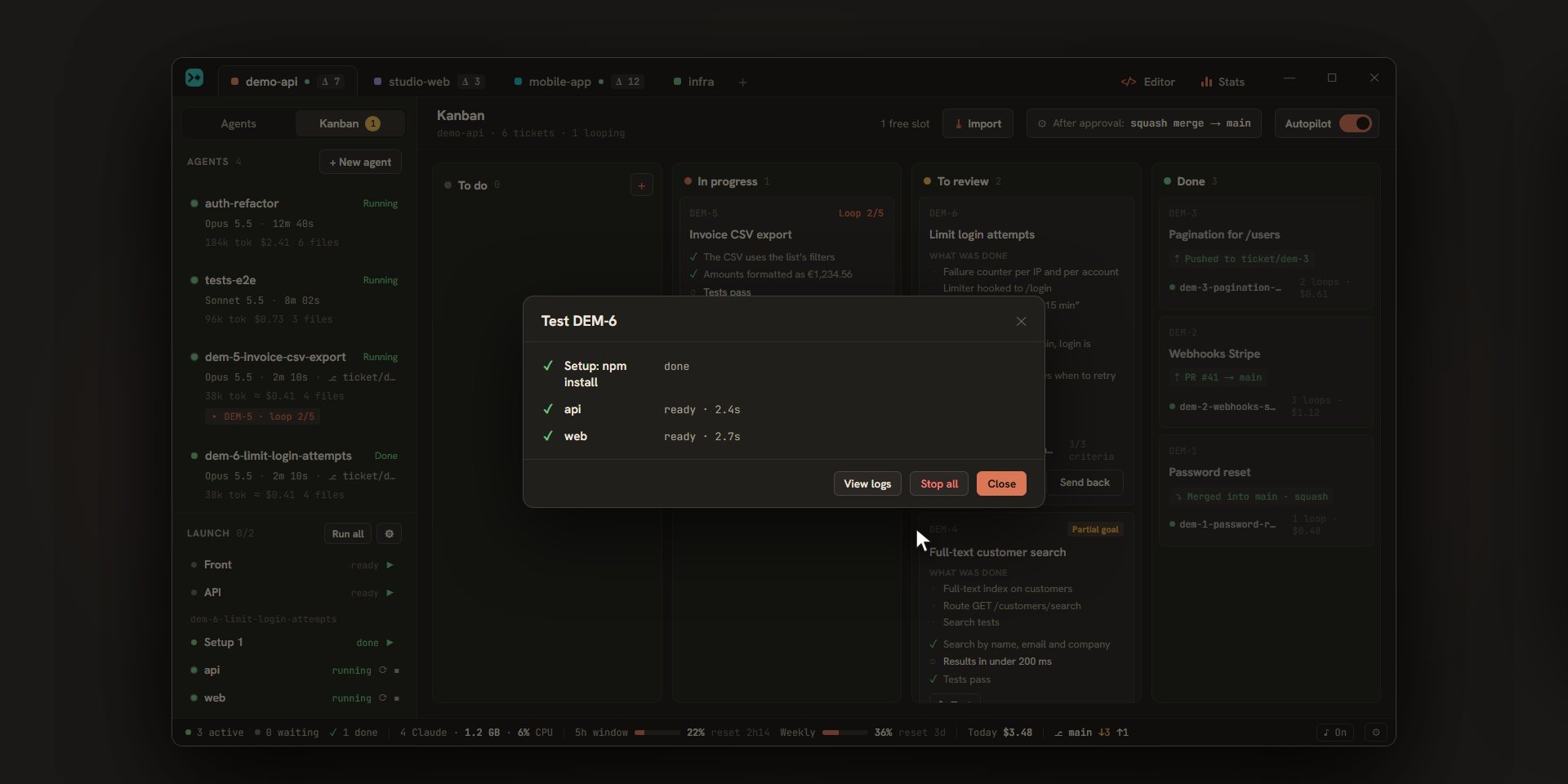
A ticket moves to “To review”: “Test” shows you the agent’s test plan, starts its servers on their reserved ports and opens your browser on the feature.
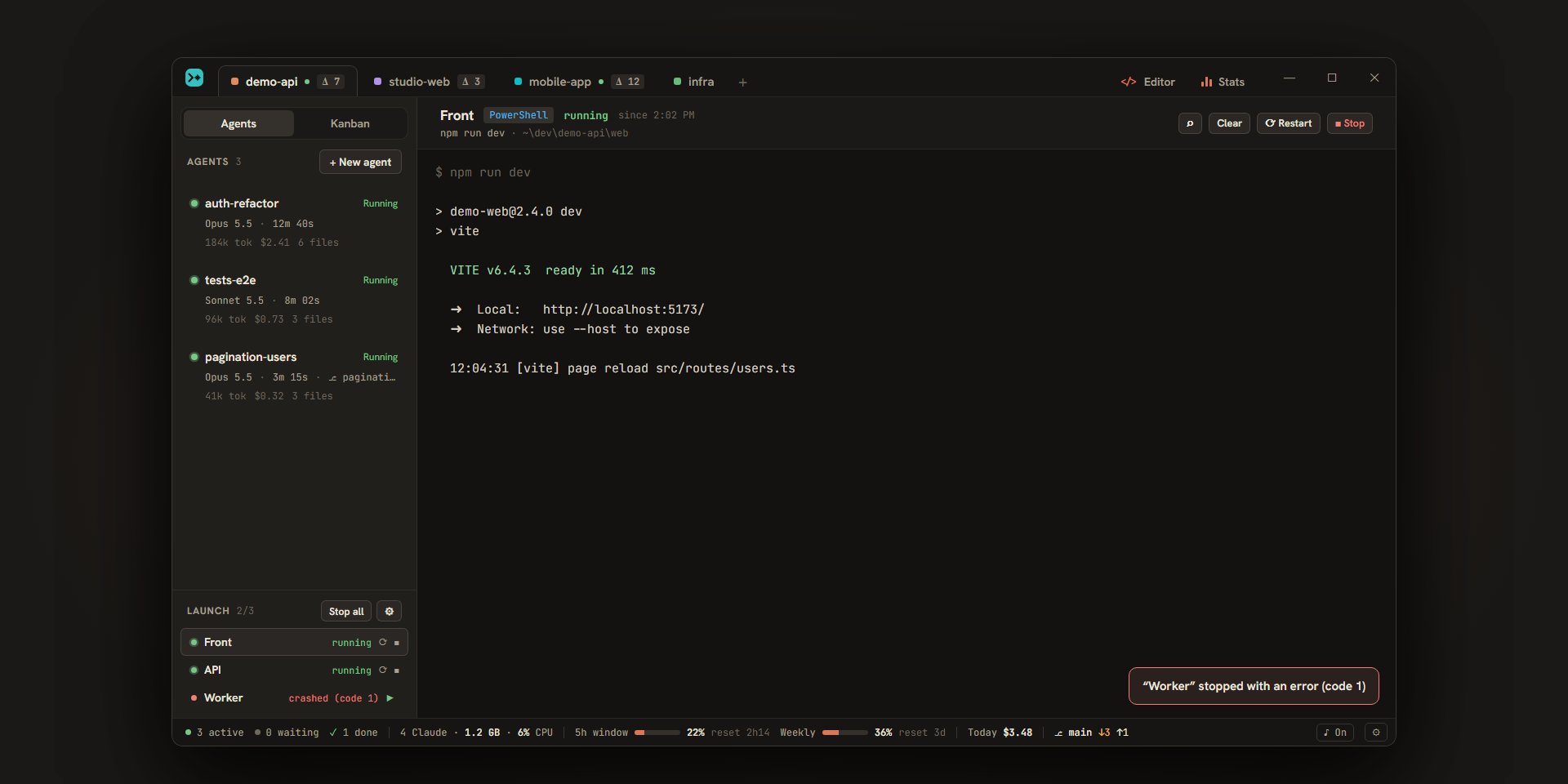
The commands that run your project (front end, API, worker…), written by you or suggested from the project, each in its own terminal with its live status. A crash shows right away, with its exit code.
Switch branches, create them, clean up the merged ones, start an agent on a branch that already exists.
PowerShell, Git Bash and WSL on Windows, zsh, bash and fish elsewhere, with your shell’s autocompletion, to run your tests by hand, even in an agent’s worktree.
Ctrl+K searches the conversations, commands and tool outputs of all your agents.
A ticket you approve goes out the way you set it up: commit, merge into the target branch, push or pull request. Escouade makes the moves, the decision stays yours.
Written by the agent, or a proposed message you read before you click, in your team’s language.
An agent’s or a ticket’s worktree goes into its target branch, then gets cleaned up. A conflict goes back to the agent, which resolves it.
A ticket’s pull request opens with its description, its progress and its acceptance criteria.
The files git ignores are copied into each worktree so the app runs there, and are never committed, pushed or merged.
You lead the squad without watching over it: a signal when you are needed, cost and quotas live, and an app your agents can drive too.
A question, a finished task: the tab and the card blink, a chime sounds, a system notification says what is asked. Ctrl+J jumps to the next agent that is waiting, and closing the window stops nothing.
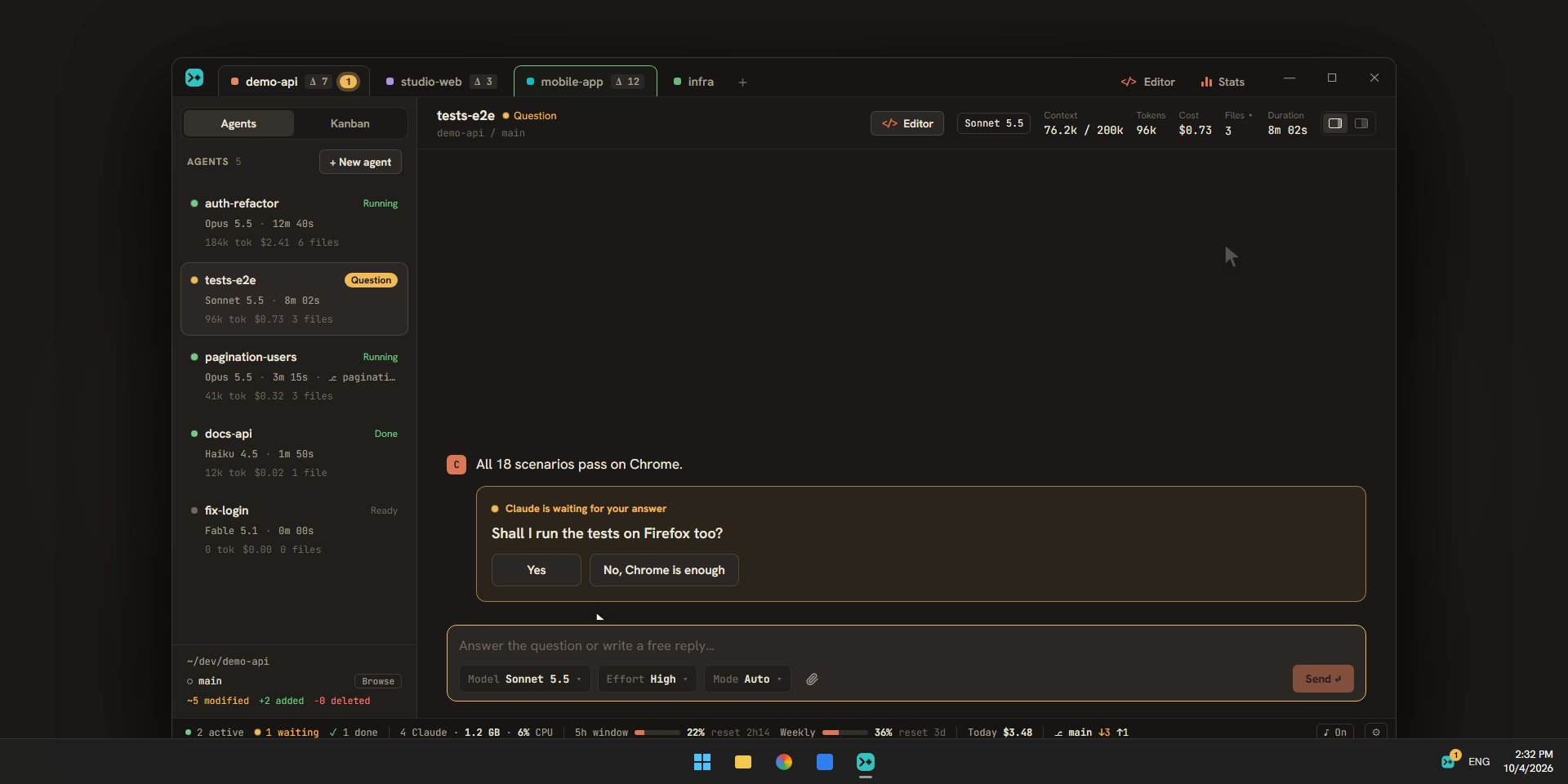
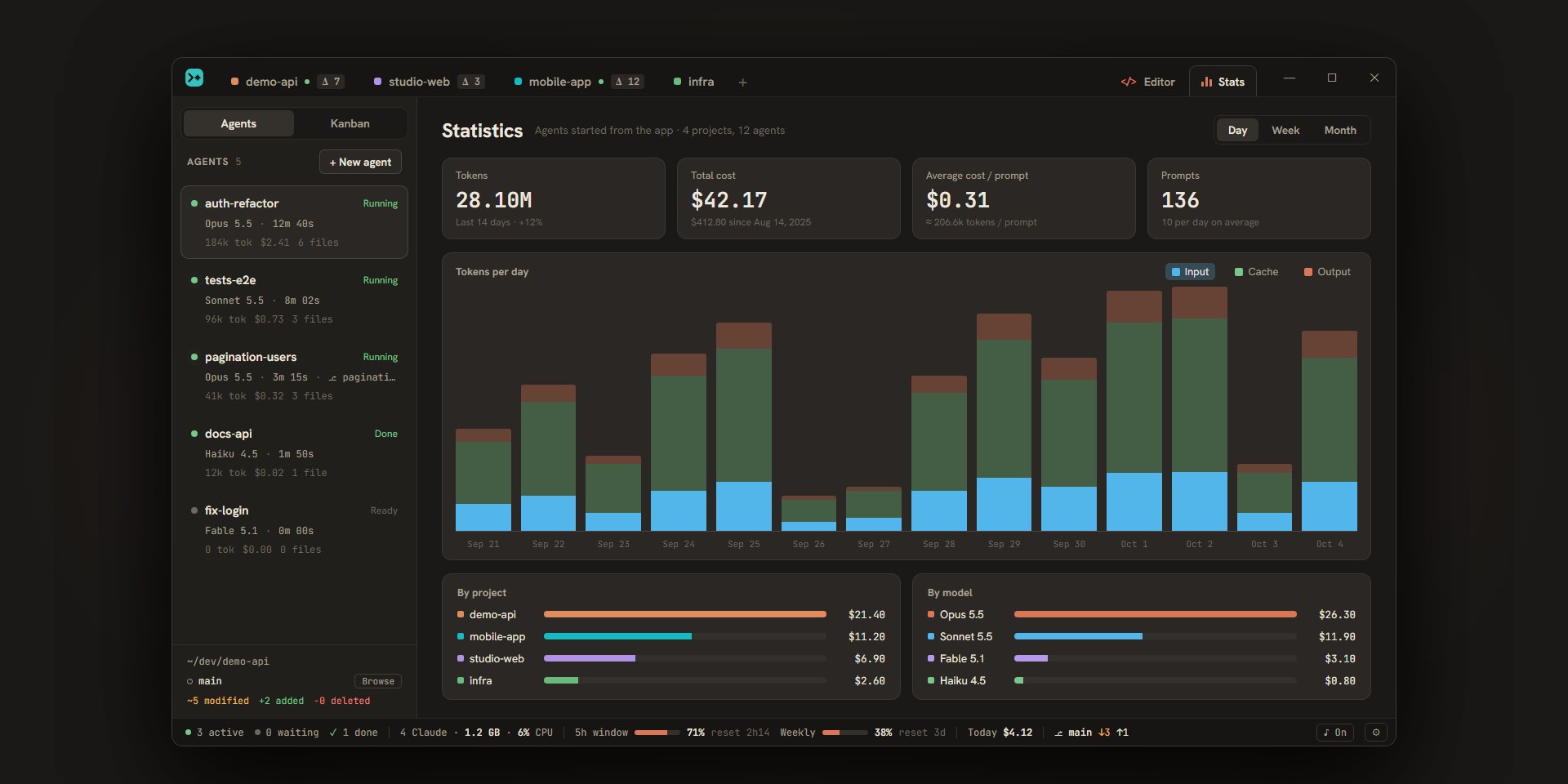
The status bar tracks your 5-hour quota, your weekly quota and the day’s cost, which climbs while your agents work. The breakdown by project, model, agent and ticket is in the statistics.
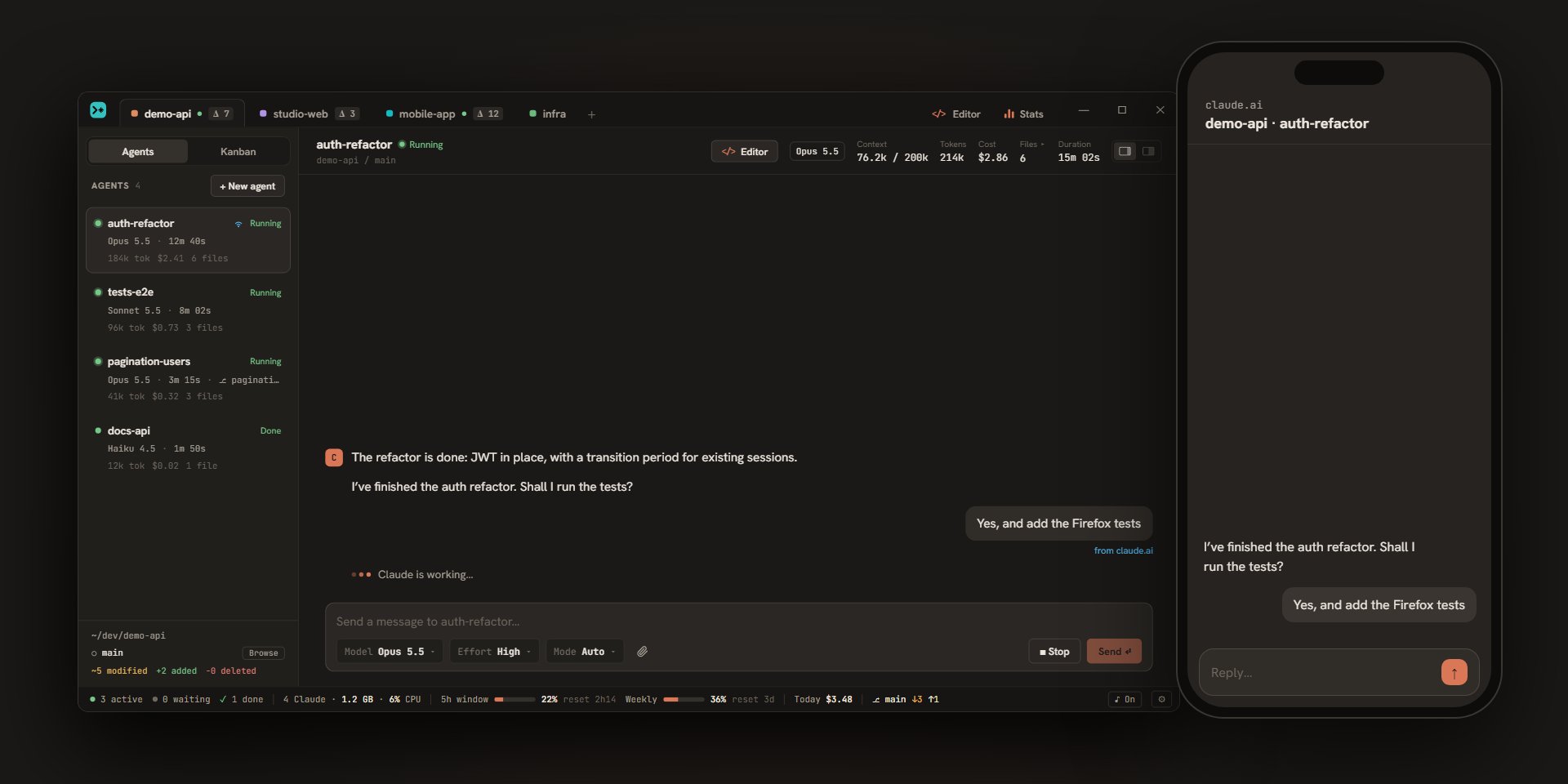
Turn on remote control for an agent: its session opens on claude.ai and in the Claude mobile app, and what you send from there also shows up in Escouade.
Personal, work: each with its own quotas and statistics, and an agent stopped by the usage limit resumes on another account.
An agent, or your assistant outside Escouade, reads your projects, creates and drives tickets, writes to agents and answers their questions, within autopilot’s safeguards.
Every agent of every project on one page, the ones waiting for your answer first.
A question, a permission request, a finished task: the agent says so, and you answer without hunting for the terminal it is waiting in. Try it: answer e2e-tests.
Run the whole e2e suite (38 tests)?
The interface in your language, and a language of its own for commits, pull requests and ticket comments.
An agent stopped by its usage limit resumes on its own as soon as your quota is back.
Window closed, Escouade stays in the notification area and resumes each session on restart.
HTTP(S) proxy for Claude, quotas, updates, integrations and, if you want, terminals.
Signed, downloaded in the background, installed without a window when no agent is working.
Ctrl+1…9 projects, Ctrl+N an agent, Ctrl+J the one that is waiting, Ctrl+K search, Esc interrupt.
Escouade’s agents run on the harness on your machine: Claude Code, Codex, OpenCode or GitHub Copilot CLI. Install it and sign in once, with your own account.
The four harnessesThe .exe for Windows 10 or 11 (with Git for Windows), the .dmg for macOS 11 or later, on an Apple Silicon or Intel Mac, the AppImage or the .deb for Linux (x86-64).
Latest releasePick a folder, create an agent and write your first request. The next ones come with Ctrl+N (⌘N on Mac).
Version 2.3 · in the works
An agent that watches over all your projects, Escouade away from your desk, and what your team knows in one place. No date promised: the work is planned in detail on GitHub.
An agent that follows all your projects for you: it starts, reviews, merges and reports back, by voice or keyboard. Tasks also start on a schedule, like a dependency review every Monday.
Follow and drive your agents from your phone: answer a question, approve a permission, check the Kanban. Or leave Escouade running day and night on a server, driven from your desk.
A project’s Kanban, spec, decisions, documents and shared memory on a server of the team, instead of staying on each machine, with a store for its private plugins.
An agentic development environment: the place where you build software with agents from start to finish, not just where you talk to them. In Escouade, you write the tickets, agents code in parallel, each in its own worktree, and you review, test and ship in the same place: Kanban, conversation, editor, terminals, Git and tests.
Not necessarily. Escouade’s editor is enough to review and touch up what the agents do (file tree, tabs, search across files, go to a definition), but it has no language server and no extensions. Keep your IDE for the rest: each worktree is a real folder, which you open wherever you like.
The one on your machine, with your own account: Claude Code (Claude subscription or API key), Codex (ChatGPT account), OpenCode (the provider you choose, local models included) or GitHub Copilot CLI (GitHub account with Copilot). Each agent has its own, and the documentation compares them. Cursor CLI comes later.
Yes, and open source, under the GPL-3.0 license (or later). Escouade uses your own harness and your own account, with no middleman. If it helps you, you can support the project: buy a coffee
Nowhere: projects, conversations and statistics stay on your machine, in ~/.escouade/. The network is only used by the harnesses themselves, to read your quotas, for updates and, if you connect them, for Jira, Trello, GitHub, Linear, ClickUp, GitLab or Azure Boards, where an imported ticket gets its status and comments.
They stay on your machine: in the system keychain (Windows Credential Manager, macOS Keychain), or on Linux in the integrations file of ~/.escouade/, and are only used for calls to those services. For GitHub, Escouade can also reuse the token from gh.
Yes. The “Claude Code view” button, in an agent’s header, runs it in Claude Code’s own interface, in a terminal: your / commands, your shortcuts, your dialogs. “Escouade view” brings it back to the chat without losing the session. A setting opens new agents in Claude Code’s interface straight away. Ticket agents, which the autopilot drives, stay in the chat.
Yes. On Mac: macOS 11 or later, Apple Silicon and Intel alike. On Linux (x86-64): the AppImage, which updates itself, or the .deb for Debian and Ubuntu.
You choose how many agents work in parallel (from 1 to 6), how many loops each ticket gets at most, and at what percentage of your quotas autopilot pauses. Nothing starts while an agent is waiting for its usage limit to end, and a ticket that reaches its last loop moves to “To review” with “Partial goal”.
No. The project files that git ignores (.env* by default) are copied into each agent’s worktree so the app can run there; when you approve a ticket, Escouade refuses to commit, push or merge them.
The app checks for a new version every five minutes and downloads it in the background. It installs without an installer window, at the restart you choose, or on its own when no agent is working and everything is saved, after warning you 30 seconds ahead.
No. Escouade is an independent project, not affiliated with Anthropic, OpenAI or GitHub. Claude and Claude Code are trademarks of Anthropic, Codex of OpenAI, GitHub Copilot of GitHub.