Agents and chat
Notifications
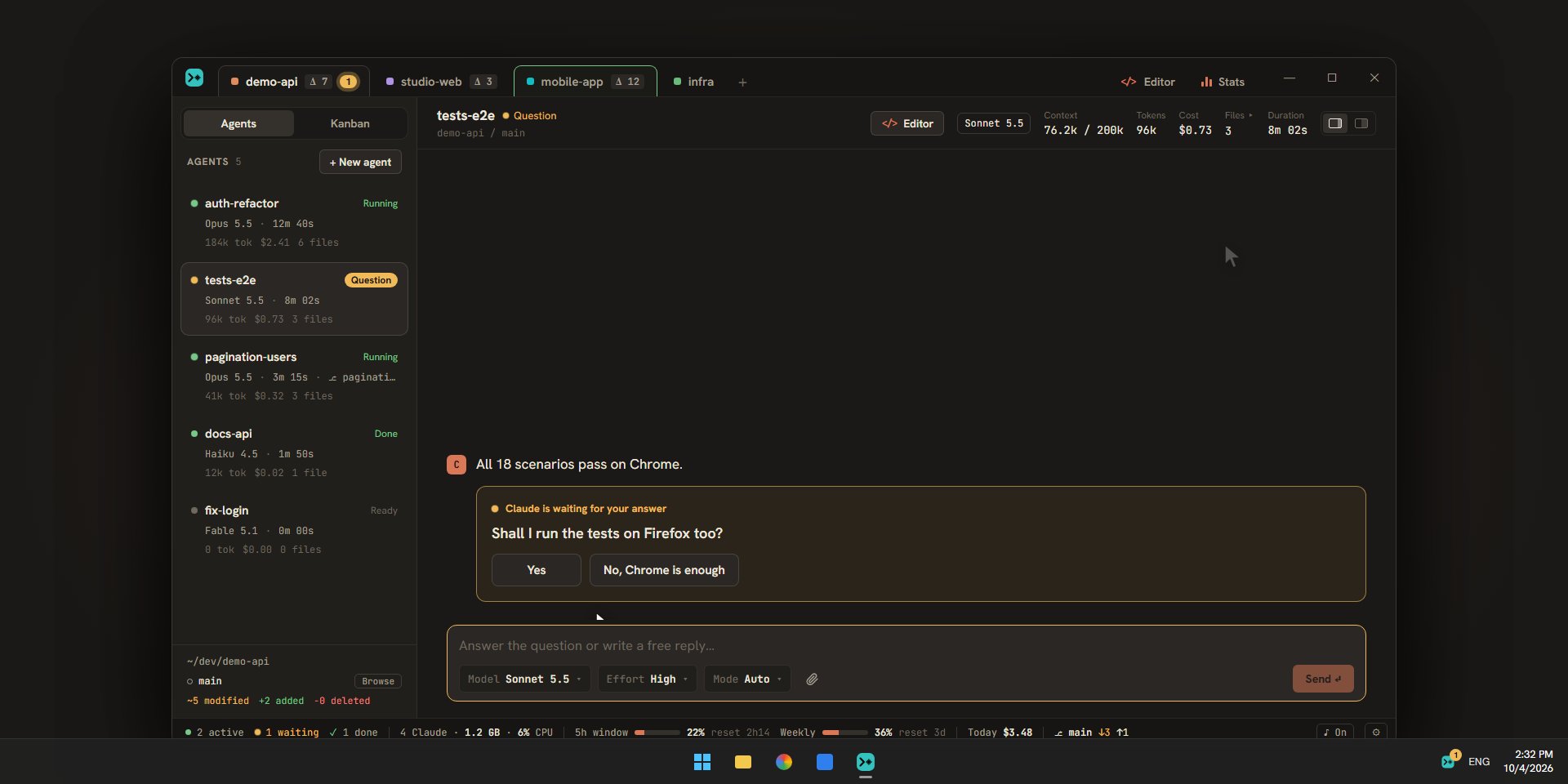
Escouade tells you when an agent asks a question, asks for permission, finishes, or fails. This page describes each signal, what a notification says, and how to choose what notifies you.
What triggers a notification
| Event | Blink color |
|---|---|
| An agent asks a question or asks for permission (“Question” status) | amber |
| An agent finishes its turn (“Done”) | green |
| An agent fails (“Error”), for example because its process stopped | red |
A ticket that reaches “To review” or gets blocked also sends a notification (see the Kanban), without making an agent blink.
These signals also apply to an agent running in the Claude Code view. When you interrupt a turn yourself (Esc), or when a message sent during the turn is waiting in the agent’s queue, the end of the turn sends no notification. For an agent working on an “In progress” ticket, only its questions notify you: the Kanban announces when the ticket is ready to review or blocked.
In the window
The tab and the card that blink
When an agent asks a question, finishes, or fails while you weren’t looking at it, its card in the sidebar blinks, and so does its project’s tab (if it isn’t the one you’re looking at). The color says what it is: amber for a question, green for an end, red for an error. When several agents of a project need a look, the tab takes the most pressing color: error first, then question, then end. Hover over the tab to read the names (“Needs a look: refacto-auth, tests-e2e”).
The blinking lasts until you show the agent, with the window in the foreground. “Looking at” the agent means its conversation is on screen: if the editor, the Kanban, a terminal, a launch log, the statistics, or the overview hides it, the agent still needs a look. If your system asks to reduce animations, the card keeps a steady tint instead of blinking.
Counters
The project tabs show a pill with the number of agents waiting for an answer. The status bar, at the bottom, counts the “active”, “waiting”, and “done” agents, and its “N waiting” button takes you to the next agent that needs a look. Ctrl+J does the same (see keeping track of your agents).
Outside the window
The chime
A two-note chime rings when an agent asks a question, finishes, or fails. It rings even when the window is in the foreground. On Linux, it is played by paplay: without that program, it stays silent. The “♪ On” / “♪ Off” button in the status bar turns it on or off; the same setting is in Settings › Notifications, with a “▶ Test” button.
The system notification
When the window isn’t in the foreground (hidden, minimized, or without focus), Escouade also sends a system notification, on Windows and macOS. There are none on Linux. Its title is project · agent, and its text says what it’s about (see below). On Windows, a click on it brings the window back and opens the agent concerned, or the Kanban for a ticket notification. On macOS, a click brings the app to the foreground without opening the agent.
The taskbar and the Dock
When the window isn’t in the foreground, Escouade’s button flashes in the Windows taskbar, and the Dock icon bounces on macOS. On Linux, Escouade asks the system for the window’s attention; what that does depends on the desktop.
The notification area
Escouade keeps an icon in the notification area (the menu bar on macOS). An amber badge sits in its corner as long as at least one agent is waiting for an answer, and the tooltip gives the count (“Escouade — 2 agents waiting”). A click on the icon shows the window; its menu offers “Show” and “Quit”. Closing the window only hides it: the agents go on, and they notify you as usual (see agents).
What a notification says
| Case | Text |
|---|---|
| Question | The question’s text (the first one, if there are several), on one line; “Claude is waiting for your answer” if there is none |
| Permission | “Allow Bash: npm test?”: the tool, and what it acts on (the command, the file relative to the agent’s folder, the address, the search) |
| Plan | “Approve the plan: Add the PDF filter?”: the first line of the plan |
| End of turn | The first line of Claude’s reply, without Markdown formatting; “Task done” if it has no text |
| Error | “Error: ” followed by the reason, for example “Error: Claude Code stopped (code 1)” |
| Ticket | The title is the project’s name, the text “ATL-42 ready to review” or “ATL-42 blocked: ” followed by the reason |
An agent’s text is cut at 120 characters.
Notify me about
In Settings › Notifications, the “Notify me about” group chooses the types that chime and send a system notification: “Questions and permissions”, “Finished tasks”, “Errors”, and “Tickets (ready to review, blocked)”. A type turned off has neither chime nor system notification, but the tab, the card, and the taskbar (or the Dock) still flag the agent. The “Channels” group turns off system notifications all at once (“Windows notifications when the app is not in the foreground”, or “macOS” on macOS; on Linux the label also says “Windows”, but Escouade shows no system notification there), and the “Sound” group turns off the chime. All the options are described in the notification settings.
A launch command that crashes
When a launch command stops with an error (see launching the project), a red message appears in the window: it names the command and gives its exit code. The command also goes to “crashed (code 2)” in the “Launch” section of the sidebar. It isn’t a system notification and there’s no chime: the message is only seen in the window.